
WP Plugins
Independent Analytics
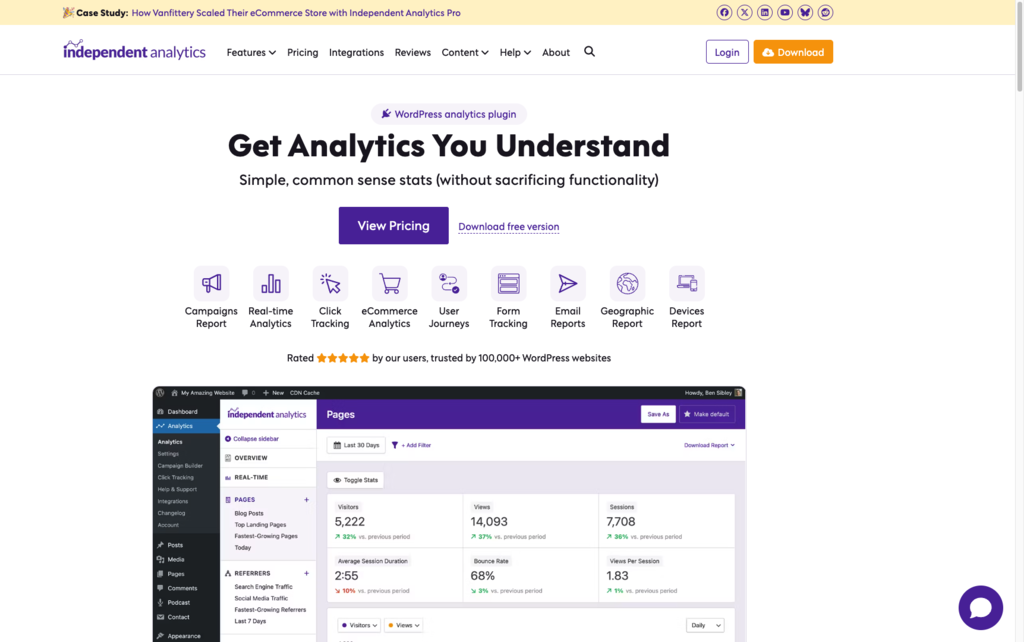
Independent Analytics offers a straightforward alternative to complex tools like Google Analytics, with reports that live directly in WordPress and focus on the numbers most site owners actually use. The privacy-first, cookieless tracking and unlimited sites/visitors make it appealing for agencies and publishers managing multiple projects. Its Pro features extend naturally from the free version, so teams can grow into more advanced analytics without switching platforms.
Independent Analytics uses a freemium model, with a free core WordPress plugin and optional Pro upgrade that unlocks advanced reports and features.
Refund and guarantee details are not specified on the main marketing page. Free usage of the core plugin is available with no stated limits on sites, visitors, or data retention duration.
Independent Analytics appears to be a growing, stable WordPress analytics solution, with over 100,000 sites using it and an active feature set that includes both free and Pro reports. The presence of a public changelog, roadmap, and many recent reviews suggests ongoing development rather than a one-off launch. Based on these signals, it fits in the “growing/stable” category rather than early beta or legacy status.
- Rated 4.8/5 stars from over 140 reviews, as shown on the official site.
- Trusted by 100,000+ WordPress websites according to the product homepage.
- Highlighted by creators like WPTuts, whose reviewer reports using it as their primary analytics tool for over a year.
- Showcases testimonials from agencies and freelancers who prefer it over Google Analytics for simplicity and accessibility.
- Features case studies, such as an eCommerce store scaling with Independent Analytics Pro.
- Tracks page views, referrers, devices, and geographic data directly inside your WordPress dashboard so you can see what content and traffic sources perform best.
- Provides a real-time analytics view (Pro) so you can watch visitors arrive and move through your site as it happens.
- Offers an Overview Report (Pro) that lets you build a custom analytics dashboard focused on the metrics you care about most.
- Includes Solo Reports (Pro) for deep dives into individual pages or referrers when you need more granular insights.
- Integrates with major eCommerce plugins like WooCommerce, SureCart, Easy Digital Downloads, FluentCart, and Paid Memberships Pro to tie orders and customers back to traffic sources.
- Connects with a wide range of form plugins (including Contact Form 7, WPForms, Gravity Forms, Fluent Forms, Ninja Forms, Formidable Forms, Forminator, and others) so you can see where leads come from and which forms convert best.
- Works with popular page builders and theme tools like Elementor Pro, Divi, Bricks Builder, Avada, Kadence Blocks, and more, making it easy to use on modern WordPress stacks.
- Supports various lead capture and newsletter tools such as MailPoet, Mailchimp for WordPress, Convert Pro, Hustle, and similar plugins.
- Sends scheduled email reports (Pro) so you and your clients can receive key analytics summaries in your inbox without logging into WordPress.
- Automatically tracks campaigns via custom links (Pro), recording traffic, leads, and sales from each marketing effort without extra setup.
- Campaigns dashboard (Pro) lets you compare performance across marketing campaigns to see which channels drive the most valuable visitors.
- eCommerce Analytics (Pro) shows where your best customers come from, helping you refine ad spend and promotional efforts.
- User Journeys (Pro) reveal how visitors move through your pages, giving you insight into common paths and drop-off points.
- Form tracking (Pro) reports on which traffic sources and pages generate form submissions, so you can focus on what actually converts.
- Customizable Overview Report (Pro) allows you to assemble your ideal analytics layout, prioritizing specific charts, tables, or metrics.
- Solo Reports (Pro) let you tailor analysis for a single page or referrer, helping you answer specific questions without wading through global data.
- Uses cookieless tracking and avoids storing personal data, supporting compliance with privacy laws like GDPR and CCPA.
- Stores all analytics data in your own WordPress database, with no communication to external analytics servers.
- Includes an option to automatically purge old data after a chosen period, helping you control database size over time.
- Designed to run via a lightweight asynchronous request to your own site, minimizing performance impact.
- WordPress site owners who find Google Analytics overwhelming and want simpler, on-site stats they can understand at a glance.
- Solo bloggers and content creators who need to see which posts, pages, and traffic sources perform best without leaving the WordPress admin.
- Small agencies managing multiple client sites that want a privacy-friendly, cookie-free analytics solution they can roll out across their portfolio.
- ECommerce store owners on WooCommerce or similar plugins who need to know which campaigns and referrers bring in their highest-value customers.
- Service businesses and lead-gen sites that rely on forms and want clear insight into which pages and channels drive inquiries.
- WordPress multisite administrators who want each sub-site to have its own analytics dashboard without external tools.
- Use it for tracking your most popular posts and pages when you want quick answers from inside WordPress rather than logging into an external analytics platform.
- Use it for understanding which websites, campaigns, and social channels send you the most engaged visitors and customers.
- Use it for monitoring mobile vs. desktop traffic so you can prioritize design and optimization work for the devices your audience actually uses.
- Use it for analyzing where leads and form submissions originate, helping you invest more in high-converting channels.
- Use it for tying eCommerce sales back to traffic sources, so you can see which marketing efforts generate real revenue.
- Use it for privacy-focused analytics when you want to reduce or remove cookie consent banners and still keep meaningful stats.
- WordPress analytics plugin that installs and updates like any other WP plugin.
- Built specifically for WordPress sites; it cannot be used on non-WordPress platforms.
- Tracking code is injected automatically by the plugin, so no manual script placement is required.
- Stores analytics data in your own WordPress database, avoiding external analytics servers.
- Compatible with WordPress multisite, with each sub-site able to run its own analytics dashboard independently.
- Designed to be lightweight, using a single asynchronous REST API request to minimize impact on page load performance.
Independent Analytics positions itself as a simpler, privacy-first alternative to traditional hosted analytics tools that require cookies and complex dashboards. Unlike external platforms, it lives entirely inside WordPress, auto-injects tracking, and integrates deeply with forms and eCommerce plugins without extra setup. This makes it a good fit for teams who want understandable stats, own their data, and reduce reliance on third-party tracking scripts.
- Provides support via email, with a direct support address listed on the site for reaching a real person.
- Offers a knowledge base, getting started guides, and an AI assistant to help answer common setup and usage questions.
- Maintains public resources like a changelog and roadmap, signaling active development and giving users visibility into upcoming improvements.
- Only works on WordPress sites; there is no support for other CMSs or standalone HTML sites.
- Does not currently support importing historical data from Google Analytics, so tracking starts from installation onward.
- Primarily accessed through the WordPress admin, with no separate native mobile apps mentioned.
- Very high-traffic sites (around one million or more visitors per month) may experience slower loading in the analytics dashboard according to the FAQ.